Can Rigi capture iframes that are hosted in another domain?
Rigi can only capture iframe content if it is hosted in the same domain. Otherwise, CORS will prevent Rigi from capturing the content.
CORS is a mechanism to restrict users from accessing shared resources.
This is not an error but a security measure to protect users or the website you are accessing from a potential security breach.
During the capturing process, communication between two browser tabs is established via a channel.

This channel remains active even when the URL is changed in the address bar of the application tab.
If the content of an iframe is hosted in another domain, you can capture the preview by replacing the URL in the application tab with the URL of the iframe.
You can locate the URL of an iframe using the browser developer tool functionality, or you can use the Iframe QuickLink Chrome extension, which could be a more convenient option:
Install the Iframe QuickLink extension.
In the application tab, open the extensions list.
Select the Iframe QuickLink extension. A list of iframe URLs will be displayed.
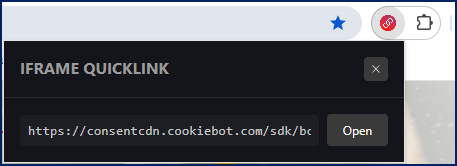
Copy the iframe's URL and paste it into the address bar or the current tab.