History docked panel
Saving, versioning, and restoring segments
Every change that you make in a segment is automatically saved when you click away from the segment. XTM Workbench automatically stores a full version history of each segment. There are two storage mechanisms:
The changed segment is automatically saved on the server.
The segment is saved locally in the browser's temporary cache. This acts as a backup if the Internet connection is down.
XTM Workbench adds to the history each time the segment is saved. The information includes the date and time of the change along with its author.
If the AI Post-Edit feature has been enabled in your XTM Cloud instance (for details, see Global AI Post-Edit settings) and has been used in a project, content entered in a segment by the AI Post-Edit feature is displayed in the History docked panel. It is marked as SYSTEM:AI_POST_EDIT.
Place the mouse cursor in the selected segment and then select the History docked panel.
Note
Tracked changes is a Beta feature.
If your XTM Cloud Project Manager has enabled the track changes feature for the project (for details, see Project Editor – General information: General information), you can see the tracked changes history for the selected segment in the History docked panel.
In XTM Workbench, open the History docked panel.
In the top right-hand corner of the History docked panel, use the Show tracked changes revisions toggle switch:
disabled (default) – revisions containing tracked changes are not displayed in the segment history.
enabled – revisions containing tracked changes are displayed in the segment history. You also see who has made a change and when. This information is displayed to all XTM Workbench users in all working modes. However, the user details that you see depend on the Information to display about users privacy settings made by your XTM Cloud Administrator (for details, see Privacy settings).
In XTM Workbench, open the History docked panel.
You can view any previous version of the current segment. To restore it, select the circular arrow
 .
.Important
Segment versions that display tracked changes cannot be restored from the segment history.
Tracked changes is a Beta feature.
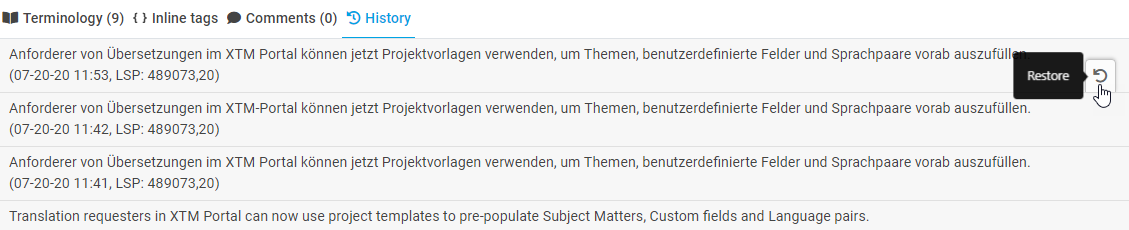
Restoring segments in XTM Workbench
You can also restore segments from the local backup.